


Smart apps that make your work and your day easier.
We create PC apps that solve real problems: for shops, car dealerships and companies, plus tools that make life easier for students and workers. Start with a ready-made app today, or ask us to build one for your idea.
- Monthly or yearly plans
- Windows 10 and 11
- Your data on your device
 Thakira
 Sila
 Haykal
Our apps: sales, inventory, customers, archiving and car dealerships
Each app has one clear job, and all of them run on your device. Scroll down to meet each one, or jump straight to it.
 Sales, Inventory & Accounting
Daftar Arabic
A business system for shops and small companies: barcode POS, invoices and quotations, cash drawers closed by actual count, receipt and payment vouchers, assets, employees and payroll.
Learn more
Company Documents & Administration
Thakira Arabic · English
A company management hub: documents with search inside files and images, renewal alerts, employees, branches and assets, debts and receivables, and an encrypted numbers vault.
Learn more Inventory & Stock Counts
Makhzoon Arabic
Dedicated software for items, warehouses and stock counts: barcodes, cartons, sizes and colors, blind and paper counts, and ten ready-made reports.
Learn more
Customer Management & Service
Sila Arabic · English
CRM software for any business that serves customers: one unified profile per customer, follow-ups and promises, appointments, complaints and suggestions, plus WhatsApp outreach with ready-made messages.
Learn more
Car Dealership Management
Haykal New Arabic · English
Complete software for new and used car dealerships: car inventory with photos and documents, true cost and profit margin, customers, follow-ups, appointments and test drives, quotes and sales, plus branches and permissions.
Learn moreWho do we build for?
Apps for business and for everyday use. If you don't see your app here, we'll build it for you.
Cashier, invoices, sales and barcode inventory in one app.
DaftarWarehouses & WholesaleAccurate stock counts and item movement across stores and branches.
MakhzoonCar DealershipsA file for every car with its true cost, plus customers, follow-ups and deals.
HaykalCustomer-Facing BusinessesA file for every customer, plus follow-ups, appointments, complaints and ready messages.
SilaCompanies & OfficesDocuments, licenses, staff and branches, with alerts before anything expires.
ThakiraRestaurants & CafésApps for orders, tables, the kitchen and stock, built around how you work.
We build it for youYour PC FilesTools that organize your files and folders and find anything fast.
We build it for youStudents & WorkersEveryday tools that make studying, work, time and tasks easier.
We build it for youSales, Inventory & Accounting Arabic
Daftar
Your whole business, organized in one place: inventory, sales, cash drawers, finance and staff.
Fast POS
Scan a barcode to add the item, split payment across several methods on the same invoice, and the app calculates the customer’s change.
Invoices in three designs
A4 or 80 mm and 58 mm thermal, with your logo and stamp. Print directly or save it as a PDF, and turn quotations into invoices in one click.
A cash drawer that closes by count
Open and close the cash drawer by actual count, and the difference is recorded, with pay-ins, pay-outs, expenses and bank deposits.
Connected finances
Receipt, payment, income, expense, salary and advance vouchers, customer and supplier balances, and reverse any voucher with an offsetting entry.
Employees & payroll
Employee files, attendance, leave and payroll, alerts before an ID or contract expires, and ready-made official letters.
Full inventory built in
Cartons, variants, blind counts, count sheets and barcode labels — everything your inventory needs, in the same place.
DaftarReal screenshots from inside Daftar
The program interface is in ArabicCompany Documents & Administration Arabic · English
Thakira
Ask for any number or document in your company and find it in seconds, even inside images and scanned files.
Ask the way you talk
Type “payroll account IBAN” or “branch lease contract” and the number and document appear, with the word highlighted on the page.
Reads images and scans
OCR in Arabic and English together, extracting IBANs, VAT numbers, commercial registration (CR), ID numbers and Hijri dates.
No license expires by surprise
Alerts before licenses, residence permits and contracts expire, a readiness score for each branch and employee, and a link to the government portal to renew each document.
Encrypted numbers vault
Portal logins, utility meter numbers and subscription accounts encrypted with AES-256, and anything you copy is cleared from the clipboard after 30 seconds.
Company devices in sync
Sync over the office network, an encrypted cloud folder or a USB drive. The main device approves every new device and decides what it receives.
Letters & company pack
Introduction letters and experience certificates with your logo and stamp, plus a single PDF of company documents ready for the bank or a tender.
ThakiraReal screenshots from inside Thakira
Inventory & Stock Counts Arabic
Makhzoon
What do you have? How much? And where is it? Accurate barcode stock counts for your shop and warehouses.
Barcode at every step
Receive, issue and transfer multiple items in one transaction: scan, enter the quantity, press Enter. Scanning a carton barcode adds a full carton.
Stock counts without guesswork
Blind counts hide the system quantity from the employee. Paper count results are entered in the same order as the sheets, then you recount only the discrepancies.
Sizes and colors without the mess
One model number with up to three variant types you name yourself, and a matrix to pick only the combinations you actually stock. Each variant has its own barcode and price.
By carton and by piece
Set the pieces per carton and its outer barcode, and quantities show in cartons and pieces on every screen and report.
Ready-to-print barcode labels
Eight preset sizes plus a custom size, on roll or A4 paper, with price and branch name — up to 5,000 labels in one batch.
Every warehouse tracked separately
Stock balance for every item in every warehouse, transfers between warehouses, and a card for each warehouse showing its value at cost and its latest movement.
MakhzoonReal screenshots from inside Makhzoon
The program interface is in ArabicCustomer Management & Service Arabic · English
Sila
A profile for every customer, a date for every promise, a fix for every complaint, and WhatsApp messages in one click.
Contact everyone
A reusable contact list: open WhatsApp with a personalized message for each customer, log the outcome — replied, no answer, visited the shop — then move on to the next.
Complete customer profile
Timeline, complaints, promises, appointments and documents in one profile, with a relationship health score from 0 to 100.
No promise forgotten
Every promise made to a customer and every scheduled follow-up appears on time for the person responsible, and anything overdue stands out clearly.
Complaints with target resolution times
Priorities and a target resolution time for every complaint with an alert when it's exceeded, a drag-and-drop board, and customer satisfaction ratings.
Tailored to your business
Add the fields your work needs to the customer profile, whatever your business. Reorder them, hide what you don't need, and get started fast with ready-made templates.
Documents from your phone
Scan a QR code with your phone and upload a photo of an invoice or prescription straight to the customer profile over the shop's network.
SilaReal screenshots from inside Sila
Car Dealership Management New Arabic · English
Haykal
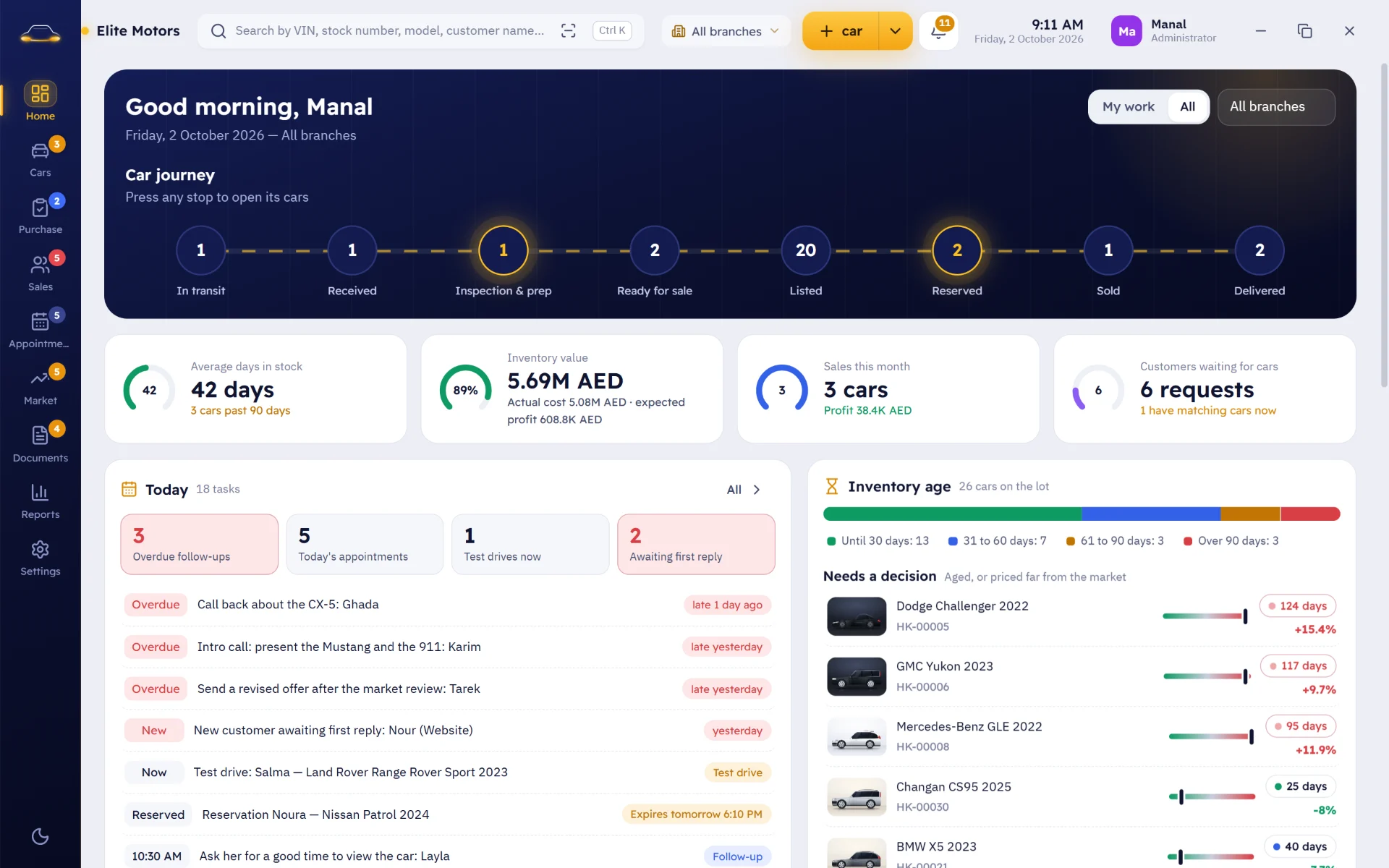
Every car with its file, photos and true cost, and every customer with a follow-up, all in one place.
A complete file for every car
VIN, specs, photos, documents, status and location in one file, with no duplicate VINs.
Price comparison
Compare your car's price with similar cars from your own dealership data. The decision is always yours.
The true cost
Purchase, transport, maintenance, repairs, cleaning, inspection and fees add up automatically, so the real profit margin shows at the sale, with a prep checklist for used cars.
No customer slips away
A timeline for every customer, stages from first contact to sale, smart follow-ups with the next action, and an alert when a car a customer is waiting for arrives.
Appointments, test drives & holds
Appointments with the customer, car, salesperson and branch, test drives with check-out and return times, and temporary holds so a car is never sold to someone else without a warning.
Professional quotes
A PDF quote with your dealership branding, the car photos, specs and terms, printed or sent by email or WhatsApp, and logged in the customer file.
HaykalReal screenshots from inside Haykal
Your data stays on your device, not on servers you don't know. Our apps run on your device at full speed, and keep their backups wherever you choose.
What you'll notice from day one
Fast, right on your device
They run straight on your device, so search, saving and reports are instant.
Your data is yours
The database lives on your device, and backups go to the folder you choose: a USB drive or another disk.
Arabic from the ground up
Right-to-left screens, plus Arabic invoices, reports and labels done properly. Not a translation layered over foreign software.
Permissions for every employee
Cashiers see only what they need, stock counters can be kept from seeing quantities if you like, and every action is logged under the name of whoever did it.
A clear subscription
Monthly or yearly, whichever suits you. If your subscription stops, your data stays safe as it is, and the app is back the moment you renew.
Talk to the people who built it
Support comes straight from the development team, and updates arrive as a signed file that backs up your data before it installs.
Which app fits your business?
3 short questions to find the app that fits your work.
Pricing
Prices are for one device. To run it on more than one device, choose “Custom” and contact us.
Monthly
No annual commitment
- License for one device
- All updates while your subscription is active
- Technical support by email
Yearly
Two months free
- License for one device
- All updates for the full year
- Technical support by email
- Remote installation and training
Custom
For multiple devices or branches, or special requirements
- Multiple devices or branches
- Customizations to fit your business
- Data migration from your old software
Monthly
No annual commitment
- License for one device
- All updates while your subscription is active
- Technical support by email
Yearly
Two months free
- License for one device
- All updates for the full year
- Technical support by email
- Remote installation and training
Custom
For multiple devices or branches, or special requirements
- Company Edition: sync across company devices
- Multiple devices or branches
- Customizations to fit your business
- Data migration from your old software
Monthly
No annual commitment
- License for one device
- All updates while your subscription is active
- Technical support by email
Yearly
Two months free
- License for one device
- All updates for the full year
- Technical support by email
- Remote installation and training
Custom
For multiple devices or branches, or special requirements
- Multiple devices or branches
- Customizations to fit your business
- Data migration from your old software
Monthly
No annual commitment
- License for one device
- All updates while your subscription is active
- Technical support by email
Yearly
Two months free
- License for one device
- All updates for the full year
- Technical support by email
- Remote installation and training
Custom
For multiple devices or branches, or special requirements
- Your business fields and message templates set up for you
- Multiple devices or branches
- Customizations to fit your business
- Data migration from your old software
Monthly
No annual commitment
- License for one device
- All updates while your subscription is active
- Technical support by email
Yearly
Two months free
- License for one device
- All updates for the full year
- Technical support by email
- Remote installation and training
Custom
For multiple devices or branches, or special requirements
- Multiple devices or branches
- Customizations to fit your dealership
- Data migration from your old software
Build your bundle
Pick more than one app and save 10% on two and 20% on three or more.
Have an idea or an everyday problem? We build the app for it.
Every one of our apps started from a real need. Tell us what slows you down at work or in your day: in your shop, restaurant or company, or even in the files on your PC, and we will design an app that fits it.
Tell us your idea- 1
We listen
We get to know your idea or business, and what slows you down today.
- 2
We sketch it out
We send you the screens and reports before writing a single line of code.
- 3
We build and review with you
We show you the program stage by stage and refine it until it matches how you work.
- 4
We deliver and support
Installation and training for your staff, then updates and support after delivery.
Articles for your work and your day
 Document Expiry Reminder Software: Renew Licenses and Residence Permits Before the Fine Arrives
A license that expires without anyone noticing can mean a fine or a stalled job. Learn a practical way to track document expiration, and how Thakira reminds you well before licenses, residence permits and contracts expire.
 Used Car Dealer Software: From Intake and Reconditioning to Delivery and Installments
A used car goes through a full journey: intake, inspection and prep, then listing and sale, often with a trade-in or a monthly installment along the way. Here is how used car dealer software keeps every stage in one file.
 How to Send WhatsApp Messages to Customers Without Spamming Them or Risking Your Number
Automated bulk WhatsApp messages can annoy customers and put your number at risk of a ban. Here is a practical way to send a personal message to each customer by name, and how Sila opens the chat with the message ready, so all you do is press Send.
Frequently asked questions
Do I need internet to run the apps?
No. Daftar, Makhzoon, Sila and Thakira run on your device without internet. You only need internet to send WhatsApp messages, or for Thakira's cloud sync if you choose to use it.
Where is my data stored?
On your device, in a local database, with backups in a folder you choose, such as a USB drive or another disk. We never see your data.
Can I ask about a program before buying?
Yes. Each program's page has real screenshots and an explanation of its features, and if you have any questions before buying, contact us through the form or by email and we'll answer.
How do I pay, and which payment methods are available?
Choose the monthly or yearly plan in the pricing section and press “Subscribe now” to go to a secure checkout that accepts bank cards (Visa, Mastercard and American Express), plus Apple Pay and Google Pay depending on your device. After you pay, we send you the software and your license file by email as soon as possible.
Does my subscription renew automatically, and how do I cancel?
Yes, it renews on schedule, monthly or yearly, using the same payment method. You can cancel any time from the “manage membership” link in the receipt email you get after paying, or email us and we will cancel it for you.
Can I get a refund?
Yes, within the money-back period shown on each program’s checkout page. Email us and we will arrange it with you.
What happens if my subscription ends?
The app stops at the renewal screen, and your data stays safe as it is. Once you renew, we send you a signed file and everything goes back to how it was.
I have more than one device (such as a branch with its own PC). What should I choose?
Choose the “Custom” plan and contact us. We'll work out with you how many devices you need and what each branch requires, then give you one clear price.
How do I get updates?
You receive a signed update file that you open from within the app. It saves a backup first, then installs the update and shows you what's new.
Which devices do the apps run on?
Windows 10 and 11 computers. They don't currently run on mobile phones or Macs.
Let's start with your business
Tell us what you need, and we'll get back to you with a clear answer.

Request received
Save it: use it any time on the “Track your request” page to follow your request. It is private, so keep it to yourself.
Your request has been received. Keep its number to check its status any time on the “Track your request” page.