


 Car Dealership Management New Arabic · English
HaykalCar Dealership & Used Car Dealer Management Software — for PC
Every car with its file, photos and true cost, and every customer with a follow-up, all in one place.
- A complete file for every car
- True cost and profit margin
- Smart follow-ups and test drives
Haykal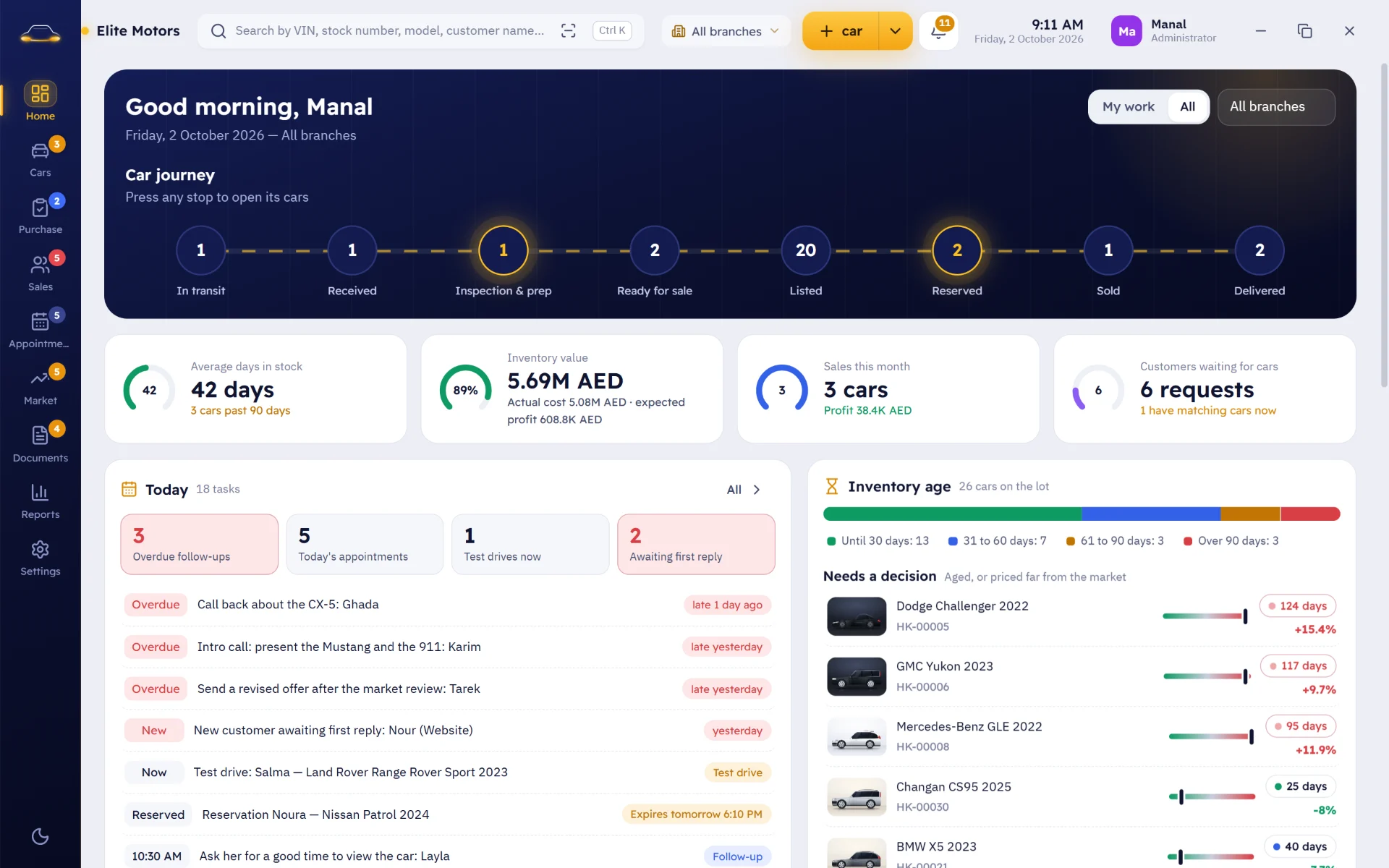
A dealer needs to know fast: which cars are in stock? Where are they? What did they really cost? How long have they been on the lot? And who is interested? Haykal answers all of this on one screen.
Every car has one file: its VIN, specs, photos and documents, its status from intake to delivery, and its exact location in the branch and lot. Its costs add up from purchase, transport, maintenance and prep, so the true profit margin shows at the sale. Every customer has a timeline of calls, quotes, appointments, test drives and reservations, smart follow-ups that remind you of the next step, and an alert when a car they are waiting for arrives.
Powerful under the hood, simple on the surface: a visual interface of photos, cards and fast search, in Arabic and English.
What Haykal does for you
A complete file for every car
VIN, specs, photos, documents, status and location in one file, with no duplicate VINs.
Price comparison
Compare your car's price with similar cars from your own dealership data. The decision is always yours.
The true cost
Purchase, transport, maintenance, repairs, cleaning, inspection and fees add up automatically, so the real profit margin shows at the sale, with a prep checklist for used cars.
No customer slips away
A timeline for every customer, stages from first contact to sale, smart follow-ups with the next action, and an alert when a car a customer is waiting for arrives.
Appointments, test drives & holds
Appointments with the customer, car, salesperson and branch, test drives with check-out and return times, and temporary holds so a car is never sold to someone else without a warning.
Professional quotes
A PDF quote with your dealership branding, the car photos, specs and terms, printed or sent by email or WhatsApp, and logged in the customer file.
Inside Haykal
All modules and features
Home
- Available, reserved, sold and in-prep cars
- Stock value and cost
- Aged cars that have stayed too long
- Today's follow-ups and appointments
- All branches or one, with figures you can click for details
Cars
- Photo grid or table view with search and filters
- An ordered photo gallery and documents with expiry alerts
- Statuses from intake to delivery
- Car location: branch, lot and spot, with a move history
- Compare two or more cars and share a car card
Cost & Appraisal
- True cost with every expense and a real profit margin
- Appraisals for purchases and trade-ins
- Price comparison with similar cars
Customers & Sales
- Customer file with budget and cars of interest
- Stages from new to sold, with the reason when a deal is lost
- PDF quotes, holds and sales
- Ready WhatsApp and email messages with the customer and car filled in
Appointments & Follow-ups
- All due follow-ups on one screen
- Appointments and test drives with check-out and return times
- Customer requests and an alert when the requested car arrives
- Salesperson tools and quick search
Branches, Reports & Security
- Multiple branches and permissions for every role
- Cost and profit visible only to authorized users
- An activity log for every important action
- Reports on stock, sales, profit and staff performance
- Complete backups including photos and documents
Haykal pricing
Prices are for one device. To run it on more than one device, choose “Custom” and contact us.
Monthly
No annual commitment
- License for one device
- All updates while your subscription is active
- Technical support by email
Yearly
Two months free
- License for one device
- All updates for the full year
- Technical support by email
- Remote installation and training
Custom
For multiple devices or branches, or special requirements
- Multiple devices or branches
- Customizations to fit your dealership
- Data migration from your old software
Questions about Haykal
Does it suit a dealership with several branches?
Yes. Branches share one database, you can view one branch or all of them, and every employee has their own permissions. To run it on more than one device, choose the Custom plan and contact us.
Does it work with my currency?
Yes. You set the currency you work with, and you can work with more than one.
Is there an AI assistant?
Yes, an optional assistant that writes car ad descriptions, summarizes a car file and a customer history, and suggests cars that match a request, using the real data in the app. It never invents specs or changes prices, and it works with an AI service key that you add.
Is Haykal dealership software or car sales software?
Both: Haykal is car dealership management software, car sales software for new and used cars, vehicle inventory and showroom software, a dealership CRM with test-drive scheduling, and used-car appraisal and trade-in software.
What should I look for in car dealership software?
Software that keeps each car's full file (VIN, photos, documents, spot on the lot) with its true cost and profit, and follows every customer from first contact to sale. That is what Haykal is built for, for one showroom or several branches, in Arabic and English.
Does Haykal handle dealership accounting?
Everything tied to your cars: purchase, transport, repair and reconditioning costs add up to a true cost per car, the profit margin shows before you sell, and deposits, payments, balances and commissions are recorded, with monthly profit and sales reports per branch. General company bookkeeping stays in your accounting software.
Is it suitable for used car dealers and installment sales?
Yes. It tracks a used car from intake, inspection and reconditioning to listing and handover, and accepts the customer's car as a trade-in deducted from the price. Quotes include a finance calculator showing the monthly installment, payment methods include bank finance and dealer installments, and payments and balances are recorded.
How do I subscribe to Haykal?
Choose the monthly or yearly plan in the pricing section on this page and press "Subscribe now" to go to checkout. If you have any questions before subscribing, contact us. After you subscribe, we send you the software and your license file as soon as possible.
Where is my data stored?
On your device, in a local database, with backups in a folder you choose, such as a USB drive or another disk. We never see your data.
Can I ask about a program before buying?
Yes. Each program's page has real screenshots and an explanation of its features, and if you have any questions before buying, contact us through the form or by email and we'll answer.
How do I pay, and which payment methods are available?
Choose the monthly or yearly plan in the pricing section and press “Subscribe now” to go to a secure checkout that accepts bank cards (Visa, Mastercard and American Express), plus Apple Pay and Google Pay depending on your device. After you pay, we send you the software and your license file by email as soon as possible.
Does my subscription renew automatically, and how do I cancel?
Yes, it renews on schedule, monthly or yearly, using the same payment method. You can cancel any time from the “manage membership” link in the receipt email you get after paying, or email us and we will cancel it for you.
Can I get a refund?
Yes, within the money-back period shown on each program’s checkout page. Email us and we will arrange it with you.
What happens if my subscription ends?
The app stops at the renewal screen, and your data stays safe as it is. Once you renew, we send you a signed file and everything goes back to how it was.
I have more than one device (such as a branch with its own PC). What should I choose?
Choose the “Custom” plan and contact us. We'll work out with you how many devices you need and what each branch requires, then give you one clear price.
How do I get updates?
You receive a signed update file that you open from within the app. It saves a backup first, then installs the update and shows you what's new.
Which devices do the apps run on?
Windows 10 and 11 computers. They don't currently run on mobile phones or Macs.
Articles about Haykal
 Used Car Dealer Software: From Intake and Reconditioning to Delivery and Installments
A used car goes through a full journey: intake, inspection and prep, then listing and sale, often with a trade-in or a monthly installment along the way. Here is how used car dealer software keeps every stage in one file.
 Car Dealership Management Software: What Should It Do Before You Buy It?
Before you subscribe to any car dealership software, check seven things: a complete file for every car, true cost and profit, customer follow-ups, appointments and test drives, quotes, branches and permissions, and reports.
 Car Dealership Accounting: How to Know Your True Profit on Every Car
Sale price minus purchase price isn't your profit. Here's how to work out the true cost per car, line by line, with a worked example that shows the gap between the profit you see and the profit you actually make.
Get started with Haykal
Tell us what you need, and we'll get back to you with a clear answer.

Request received
Save it: use it any time on the “Track your request” page to follow your request. It is private, so keep it to yourself.
Your request has been received. Keep its number to check its status any time on the “Track your request” page.
Other apps
 DaftarSales, Inventory & AccountingA business system for shops and small companies: barcode POS, invoices and quotations, cash drawers closed by actual count, receipt and payment vouchers, assets, employees and payroll.
 ThakiraCompany Documents & AdministrationA company management hub: documents with search inside files and images, renewal alerts, employees, branches and assets, debts and receivables, and an encrypted numbers vault.
 MakhzoonInventory & Stock CountsDedicated software for items, warehouses and stock counts: barcodes, cartons, sizes and colors, blind and paper counts, and ten ready-made reports.
 SilaCustomer Management & ServiceCRM software for any business that serves customers: one unified profile per customer, follow-ups and promises, appointments, complaints and suggestions, plus WhatsApp outreach with ready-made messages.